AI Jobs Productivity Reality Check
You keep hearing that AI will make work faster, cheaper, and better. That may be true in narrow cases, but the real question is harder. What do AI jobs productivity gains actually mean for your job, your team, and your pay? Right now, companies are under pressure to show results from generative AI, while workers are being told to adapt before the rules are clear. That gap matters. If output rises but staffing shrinks, the story looks very different from the glossy sales pitch. And if AI mainly helps top performers while everyone else gets more monitoring, you need to know that too. The current debate around AI jobs productivity is not really about software alone. It is about who captures the value, who absorbs the risk, and which kinds of work become easier, thinner, or more tightly managed.
What stands out right now
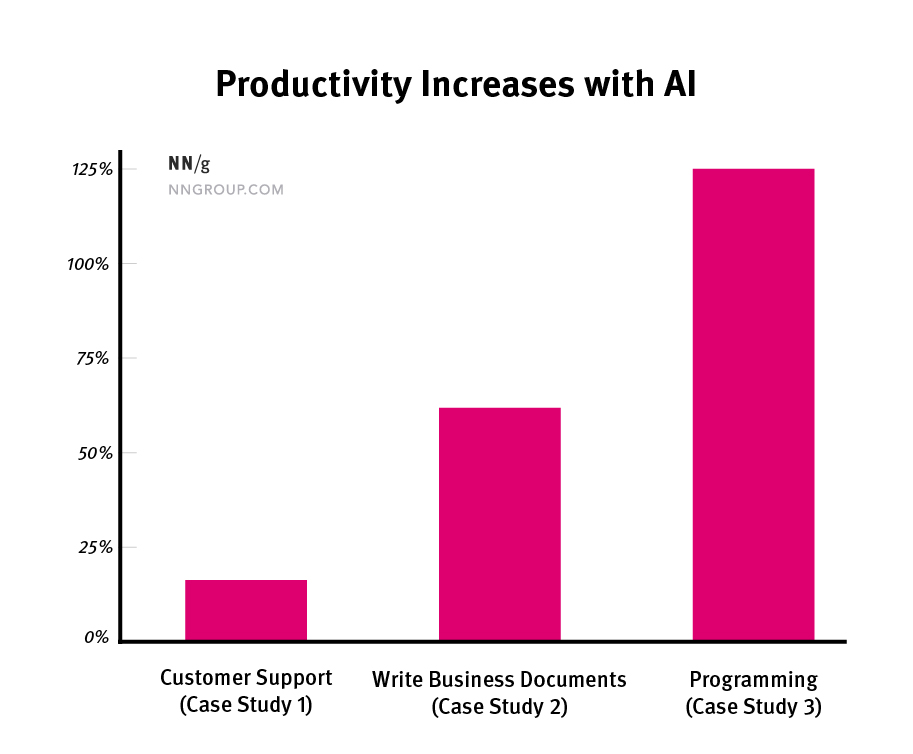
- AI jobs productivity gains are real in some tasks, especially writing, coding support, customer service, and research summaries.
- Higher productivity does not guarantee better wages, lighter workloads, or stronger job security.
- Managers are still figuring out where AI helps, where it fails, and where human review stays non-negotiable.
- The biggest near-term shift may be job redesign, not mass overnight replacement.
Why AI jobs productivity is such a loaded idea
Productivity sounds simple. More output in less time. But work is rarely that neat. A lawyer does not just write faster. A support agent does not just answer more tickets. Quality, judgment, error rates, and trust all sit inside the same equation.
That is why AI jobs productivity can be both a real gain and a misleading metric. If a worker produces 30 percent more drafts but spends extra time checking false claims, is that a win? Sometimes yes. Sometimes no. Honestly, it depends on the job, the system, and the cost of mistakes.
Productivity gains matter most when they hold up after human review, not just when a dashboard shows more activity.
Where AI is actually improving work
Some use cases are plain to see. Generative AI can speed up first drafts, summarize long documents, suggest code, organize notes, and handle repeat customer questions. That can remove grunt work, which is often the part people least enjoy.
Look at the pattern. AI tends to do best when the task has a clear format, lots of prior examples, and a low penalty for a rough first pass. Think of it like prep work in a restaurant kitchen. Chopping onions faster helps. It does not replace the chef deciding what should go on the plate.
Common areas of gain
- Drafting emails, reports, and internal memos
- Producing software code suggestions and test cases
- Summarizing meetings, contracts, or research material
- Handling routine customer support requests
- Helping workers learn unfamiliar tools faster
Several studies over the past two years have found that AI often helps less experienced workers the most. That is a big deal. It suggests AI can flatten parts of the learning curve, at least for structured tasks.
Why workers are right to be skeptical
Here is the catch. Companies do not invest in automation out of pure curiosity. They want margin, speed, and scale. So when executives talk about productivity, workers often hear a different phrase. Do more with fewer people.
That fear is not irrational. If AI lets one employee handle the volume that used to require two, management may keep headcount flat even as work expands. Or it may cut roles over time through attrition. Slow moves still count.
One sentence matters here.
Productivity is good for workers only when workers share in the upside.
Without that, AI can become a tighter stopwatch. More surveillance. More quotas. More pressure to hit machine-shaped benchmarks that ignore the messy parts of real work.
What managers tend to miss about AI jobs productivity
A lot of leaders still treat AI as a plug-in for labor. Drop in a model, cut time, collect savings. But workplace systems do not work like that. You have training gaps, broken data, compliance rules, legacy software, and teams that do not trust the output. And yes, that friction is the story.
The cleanest productivity gains usually come from redesigning workflows, not from throwing a chatbot at every desk. A smart manager asks different questions:
- Which tasks create bottlenecks?
- Where is review time eating the savings?
- What errors are too expensive to automate?
- Which employees need support to use AI well?
- How will gains be measured beyond raw speed?
That is less flashy than the usual pitch. It is also closer to reality.
The wage question nobody should dodge
If AI boosts output, should pay rise too? You would think so. History is messier. Productivity growth has not always translated into broad wage growth, especially when bargaining power is weak and the gains are captured by firms or a small slice of top talent.
So the real issue is distribution. Does AI make your work more valuable, or just more trackable? Does it free you to handle higher-level tasks, or does it compress your role into faster piecework?
But that answer will vary by occupation.
Workers in fields with scarce expertise, client trust, or legal accountability may use AI as a force multiplier. Workers in highly standardized roles may face tighter scripts and lower leverage. Same technology. Different outcome.
How to judge AI jobs productivity in your own workplace
You do not need to wait for a think tank report to see what is happening. Watch the incentives. They tell you more than the slogans do.
Use this quick test
- Measure the real task. Track end-to-end time, not just draft speed.
- Count review costs. If checking AI output eats the savings, that matters.
- Watch staffing decisions. Are teams growing, holding flat, or shrinking after AI rollout?
- Check quality drift. Faster output means little if errors, complaints, or rework rise.
- Follow the rewards. Are workers getting better pay, better scope, or just bigger quotas?
If leadership cannot answer those questions clearly, the productivity case is still soft.
What the next phase will probably look like
The loudest claims about immediate labor replacement were always shaky. The more likely path is uneven and slower. Some jobs will be trimmed. Some will expand. Many will be reassembled around AI-assisted tasks, with more emphasis on editing, exception handling, judgment, and client-facing work.
That shift could still be seismic for white-collar work. Entry-level roles may change the most because they often contain the structured tasks AI handles well. That creates a real problem. If junior workers do less basic drafting or research, how do they build skill? Every newsroom, law firm, consultancy, and software shop should be asking that now.
The best question is not whether AI replaces people. It is which parts of a job get stripped out, and what that does to the career ladder.
What to do next if AI is coming for your workflow
Look, resisting every tool is not a plan. Blind faith is worse. The practical move is to learn where AI saves time, where it creates risk, and where your human edge still holds.
- Get good at reviewing AI output for accuracy and tone
- Build expertise in tasks where judgment carries weight
- Document where AI helps and where it slows work down
- Push managers to measure quality, not just throughput
- Ask how gains will affect workload, role design, and pay
That last point matters most. If your company talks endlessly about productivity but never about job quality, training, or compensation, pay attention. The future of AI jobs productivity will not be decided by the model alone. It will be decided by management choices, worker leverage, and whether anyone insists that faster work should still be better work. So ask the blunt question now: who is this efficiency really for?