ChatGPT Prompt Tips That Actually Improve Results
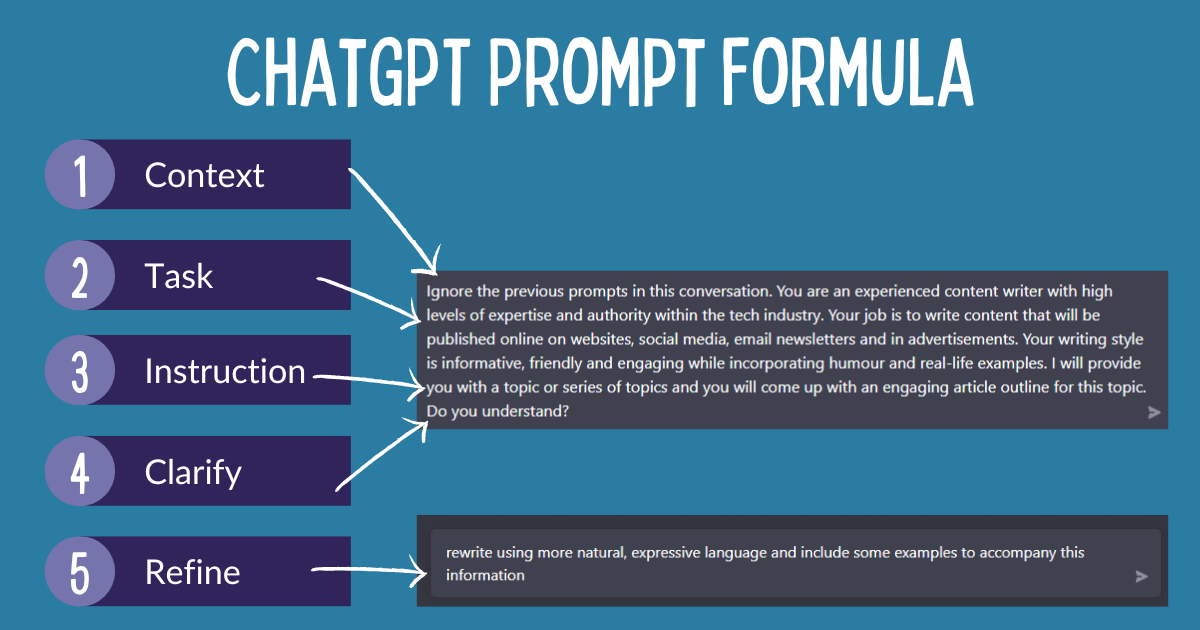
You can get better answers from ChatGPT, but only if you stop treating prompts like a quick search box. The model responds to structure, context, and constraints. That matters now because more people are using it for drafts, summaries, planning, and research, and weak prompting wastes time fast. The right ChatGPT prompt tips do not require magic wording. They require better instructions. What do you want the model to do, what should it avoid, and what output format will actually help you? Ask that clearly, and the quality jumps.
- Give the model a role, a task, and a format.
- Use examples when you want a specific style.
- Break hard jobs into smaller steps.
- Ask for assumptions and limits, not fake certainty.
- Revise prompts the same way you revise writing.
Why ChatGPT Prompt Tips Matter More Than Prompt Hype
People love to obsess over one perfect prompt. That is the wrong lesson. Better results usually come from better framing, not a secret phrase. OpenAI and Anthropic both show this in their own guidance: models respond more reliably when you define the task, the audience, and the output shape.
Think of prompting like giving directions to a contractor. If you say, “make the room nicer,” you may get fresh paint and a bill. If you say, “replace the worn floor, keep the wall color, and leave the window trim alone,” you get something closer to what you meant.
Good prompts reduce ambiguity. They do not try to sound clever.
ChatGPT Prompt Tips for Better Answers
Start with the job you want done. Then add the context ChatGPT cannot guess. If you need a sales email, say who it is for, what the offer is, and what tone you want. If you need a summary, say how long it should be and what details matter.
- Name the role. “Act as a product manager” or “Act as a technical editor.”
- State the goal. “Turn these notes into a launch brief.”
- Set constraints. Word count, tone, reading level, region, or format.
- Give source material. Paste the text, data, or bullets you want it to use.
- Ask for the output you want. Table, list, email, checklist, or outline.
Want a quick test? Compare these two prompts.
Weak: “Write about cloud security.”
Better: “Write a 200-word explainer on cloud security for a non-technical CFO. Focus on breach risk, vendor access, and cost control. Use plain English and end with three action items.”
Use Examples When You Need a Specific Style
Examples are one of the most useful ChatGPT prompt tips because they give the model a target. If you want a formal tone, paste a paragraph that matches it. If you want punchy marketing copy, show the style before asking for more. The model is good at pattern matching. Feed it a pattern.
This works especially well for recurring tasks. Customer support replies. Meeting recaps. Product descriptions. Internal memos. Once you have a sample that works, keep reusing it with fresh content (and a few edits). That is faster than rewriting the same instructions every time.
How to Get More Reliable Output from ChatGPT
ChatGPT can sound confident even when it is wrong. So ask for uncertainty. Ask it to list assumptions, point out gaps, or separate facts from guesses. That simple step can save you from polished nonsense.
Use a two-pass workflow when the task matters. First, ask for a rough draft or analysis. Then ask for revisions based on a checklist. This is slower than one-shot prompting, but it works. Why trust a first draft on a messy topic when you can pressure-test it?
A better prompt sequence
- Draft the first version.
- Ask what is unclear or missing.
- Request a revised version with those fixes.
- Ask for a final pass in the exact format you need.
Here is the thing. The model is more like a sharp junior editor than a perfect oracle. Treat it that way, and you will get better work.
ChatGPT Prompt Tips for Complex Tasks
For bigger jobs, split the work into stages. Research first. Outline second. Draft third. Edit last. That structure cuts down on drift, which is when the model starts wandering off your original ask.
Use delimiters when the prompt includes multiple parts. Put instructions in one section and source text in another. That helps the model separate what you want from what you provided. It also makes your prompt easier to reuse and debug.
Example prompt: “Using the text below, extract five key points for a briefing memo. Do not add new facts. If the text does not support a claim, say so.”
That kind of instruction is boring. Good. Boring prompts often work better than flashy ones.
What to Stop Doing
Stop stacking vague adjectives on top of vague requests. “Make it amazing” is not a brief. “Make it concise, persuasive, and engaging” is still weak unless you define the audience and purpose.
Also stop assuming the first answer is the best answer. It is usually the easiest answer. The better move is to challenge it, ask for alternatives, or tell the model to critique its own draft. Think of it like a tennis rally. One shot does not win the point.
And do not bury the lead. Put the most important instruction first.
Build a Prompt Habit That Holds Up
Save prompts that work. Tweak them. Keep a small library for the tasks you repeat most often, such as summaries, email drafts, outlines, and rewrite requests. Over time, that gives you a personal prompt system instead of a pile of random experiments.
The best ChatGPT prompt tips are not glamorous. They are disciplined. Be specific, show examples, ask for structure, and push back when the answer feels too neat. That is how you turn a chat tool into something useful. What task are you still leaving to chance?