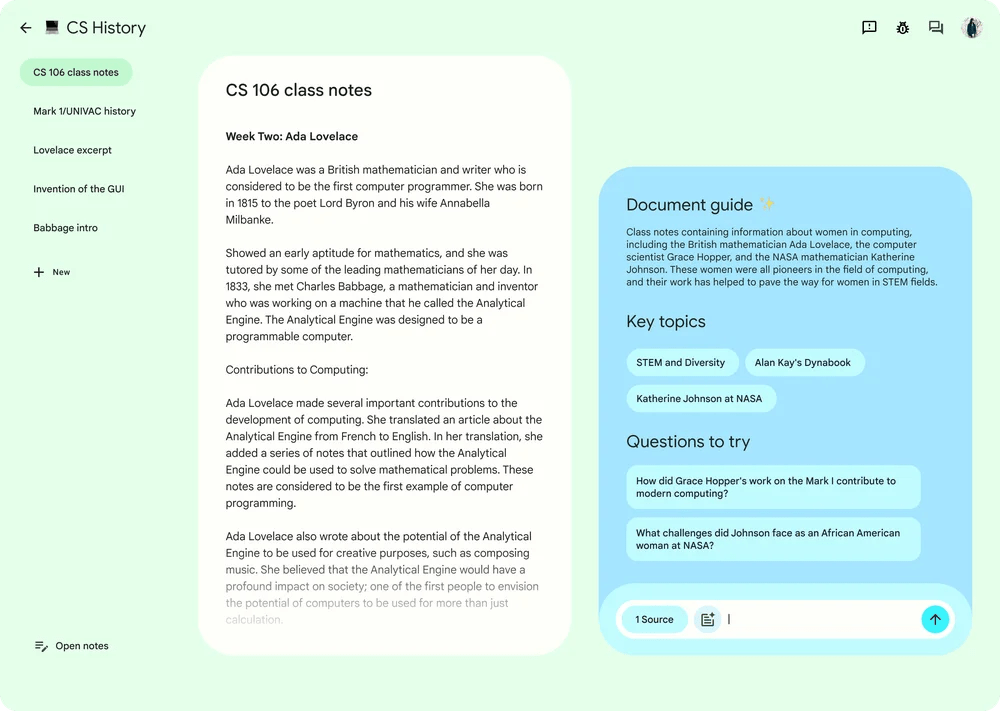
Google AI Notetaking App Adds Offline Transcription
You lose the thread fast when your recorder depends on a weak connection. That is the real pain point behind Google’s latest update. The Google AI notetaking app, according to The Verge, can now transcribe audio offline, which makes it far more useful in conference rooms, classrooms, clinics, trains, and anywhere Wi-Fi behaves like a rumor. This matters because note apps have moved from simple capture tools to work systems. They record, transcribe, summarize, and help you search what was said later. But if they fail the moment the signal drops, they are more fragile than they look. Offline transcription gives Google a more practical pitch. Less sparkle. More reliability. And for anyone who has lost interview audio to a bad network, that is the feature that actually changes behavior.
Why This Update Matters
- Offline transcription reduces failure points during meetings, lectures, interviews, and field work.
- Privacy gets a small boost because some transcription work can happen on-device instead of depending on cloud processing.
- Google is pushing AI notes toward daily utility, not only polished summaries after the fact.
- Battery, storage, and device support will decide how good this feels in real use.
What the Google AI Notetaking App Update Actually Does
The Verge reports that Google’s AI notetaking app now supports offline transcription. The basic idea is simple. You can record audio and get a transcript without needing an active internet connection at that moment.
That is a practical shift, especially for people who record in unpredictable settings. Think of a journalist in a courthouse hallway, a student in a basement lecture room, or a project manager flying home after a client workshop. The app becomes less dependent on the network and more like a real tool.
Offline transcription is not flashy, but it solves a boring problem that has annoyed users for years. Boring problems are often where the best product updates live.
Look, AI summaries get the headlines. But transcription is the foundation. If the transcript is missing, late, or wrong because the app could not connect, every AI layer above it gets shaky.
Why Offline Transcription Is a Big Deal for Google AI Notetaking App Users
Cloud transcription can work well, but it has an obvious weak spot. It needs a connection. That sounds fine until you are in a hotel ballroom with overloaded Wi-Fi or in a building where your phone shows one bar and a prayer.
Offline transcription changes the risk model. Your notes can start forming right away, even before the app syncs or adds cloud-based features later. That is closer to how people actually work.
Reliability beats novelty.
Who benefits first?
This feature helps anyone who treats notes as evidence, not decoration. If your work depends on accurate records, a dropped connection is more than an inconvenience.
- Journalists can capture interviews in the field without worrying about signal strength.
- Students can transcribe lectures in older buildings, packed halls, or transit.
- Healthcare and legal workers may find offline capture useful, though they still need to follow privacy and compliance rules.
- Teams can record meetings in offices where conference room Wi-Fi is oddly worse than the lobby.
- Researchers can collect conversations during site visits without waiting for a stable connection.
Is offline transcription perfect? No. Accent handling, noisy rooms, speaker separation, and technical vocabulary still matter. But removing the network dependency is a solid first move.
Google AI Notetaking App and the Privacy Question
Offline transcription also raises a privacy angle. If audio can be processed on-device, less data may need to travel to remote servers during the initial transcription step. That can make users feel more comfortable, especially when recordings include sensitive material.
But here’s the thing. Offline does not automatically mean private forever. Users still need to know what syncs later, what gets stored in their Google account, and whether AI summaries or search features use cloud processing after the transcript is created.
Google should make those boundaries plain inside the app, not buried in policy text. A good privacy design is like good kitchen labeling. You should not need to open every jar to know what is inside.
Questions users should ask before relying on it
- Does the app store audio locally, in the cloud, or both?
- Can you delete recordings and transcripts separately?
- Does offline transcription work on your specific device?
- Are summaries generated offline too, or only transcription?
- Can your organization control this feature through admin settings?
Those answers matter more than a glossy demo. Especially for companies, schools, and regulated industries.
How It Compares With Other AI Note Apps
Google is not alone in chasing AI notes. Otter.ai, Notion, Microsoft OneNote with Copilot features, Zoom AI Companion, and Fireflies.ai all compete to turn speech into searchable records. The market is crowded because the use case is obvious. People hate taking notes while trying to listen.
Google’s edge is distribution. If this feature ties neatly into Android, Recorder, Docs, Meet, or Workspace, it can become part of habits people already have. That is harder for standalone tools to fight.
Still, Google has to avoid a familiar trap. A feature spread across too many apps can become confusing. Is this part of Recorder? NotebookLM? Meet? Docs? Users should not need a map.
What to Test Before You Trust Offline AI Notes
If you plan to use the updated Google AI notetaking app for serious work, test it before the stakes are high. Do not make your first run a legal interview, medical consultation, or board meeting.
Run a small trial instead (ten minutes is enough). Put the phone across the table. Add background noise. Use names, acronyms, and domain terms. Then compare the transcript with what was actually said.
- Check accuracy in noise: Cafes, classrooms, and conference rooms all create different problems.
- Watch speaker labels: If the app mixes speakers, your summary may mislead you later.
- Monitor battery drain: On-device transcription can be compute-heavy.
- Review storage use: Long recordings can eat local space quickly.
- Confirm export options: A transcript is more useful if you can move it to Docs, email, or your team workspace.
Honestly, this is where many AI note products show their seams. They perform well in clean demos, then stumble when three people talk over each other near a clattering espresso machine.
The Bigger AI Strategy Behind Google AI Notetaking App Features
This update fits a broader pattern. AI features are moving closer to the device. Apple has emphasized on-device processing for parts of Apple Intelligence. Qualcomm and Google have both talked up local AI workloads on newer chips. Microsoft has pushed the idea through Copilot+ PCs.
The reason is simple. Local AI can be faster, more available, and sometimes more private. It can also reduce cloud costs for the company. That last part rarely gets top billing, but it matters.
For users, the best version is hybrid. Offline transcription handles capture. Cloud systems can later help with heavier tasks, such as cross-document search, meeting summaries, or action item extraction. Done well, it feels invisible. Done badly, it feels like a sync error with better branding.
What Google Needs to Get Right Next
Offline transcription is a strong step, but it is only one piece. The next test is whether Google can make the workflow clean from recording to transcript to summary to sharing.
My short wish list is pretty plain:
- Clear controls for local storage, cloud sync, and deletion.
- Visible accuracy cues when the app is unsure about words or speakers.
- Fast search across transcripts without forcing users into another product.
- Workspace admin settings for companies that need governance.
- Plain export paths to Google Docs, Drive, and common file formats.
Google has the technical pieces. The question is whether it can package them without making users think about the plumbing.
Where This Goes Next
The Google AI notetaking app update points in the right direction because it treats reliability as a feature. That may sound modest, but people adopt tools they can trust when the room is noisy, the network is weak, and the meeting still matters.
If you record important conversations, try offline transcription on a low-risk session first. Then read the transcript with a skeptical eye. The future of AI notes will not be won by the app with the flashiest summary. It will be won by the one you trust when the Wi-Fi dies.


