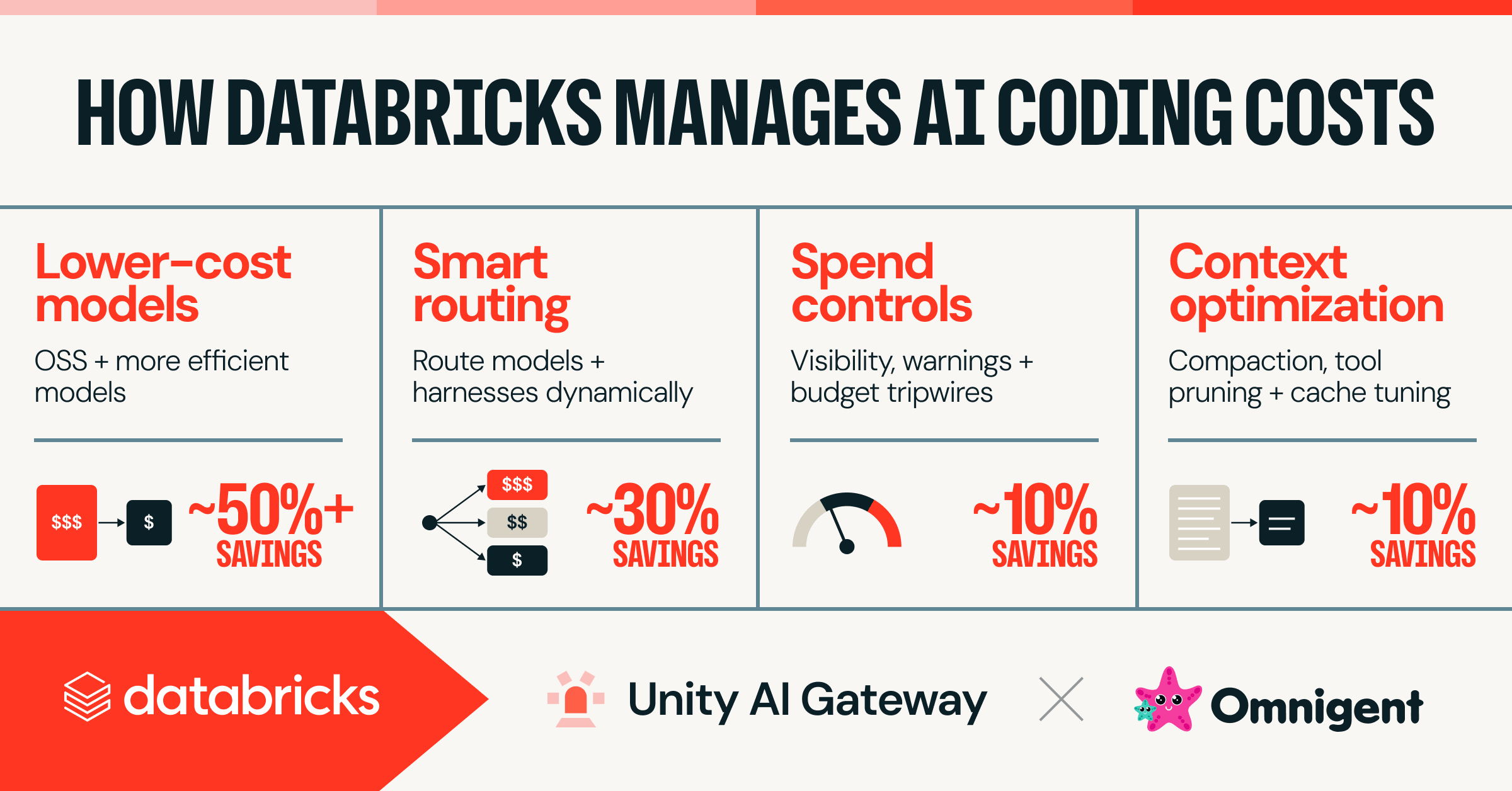
Managing AI Coding Costs at Scale
Your AI coding bill can get ugly fast. A few productive developers, a chatty assistant, and a loose policy are enough to turn a neat pilot into a monthly surprise. That is why managing AI coding costs at scale matters now. The spend is often small at first, then it spreads across teams, tools, and workflows before anyone notices.
Look, the problem is not that AI coding tools are too expensive by default. The problem is that most companies treat them like a utility with no meter. They approve seats, encourage experimentation, and hope the gains will cover the bill. Will they?
What to watch first
- Seat growth is only part of the bill. Usage spikes can matter more.
- Token-heavy tasks such as large refactors and code reviews drive cost faster than simple autocomplete.
- Policy gaps let teams use premium models for routine work.
- Shadow adoption hides spend outside central procurement.
Why AI coding costs scale so fast
AI coding tools charge for access, usage, or both. A small team can live with that. A large engineering org cannot, because model calls grow with every prompt, retry, and context-heavy request.
Databricks has pointed to the same pressure in its guidance on managing AI coding costs at scale. The pattern is familiar across the market. Developers ask for help, tools respond generously, and cost follows usage like water through a broken pipe.
Cost control is not about stopping adoption. It is about matching the right model and the right policy to the right task.
How to measure AI coding cost drivers
Start with a simple ledger. You need to know who is using which tool, which model, how often, and for what kind of work. Without that, every discussion turns into guesswork.
Track these four numbers
- Active users by team and role.
- Requests per user per day or week.
- Average context size, since bigger prompts cost more.
- Task mix, such as autocomplete, test generation, review, or refactoring.
This is where many teams trip. They see a rising invoice, then ask the wrong question. They ask whether the tool is worth it, when they should ask which workflows are paying their own way.
Managing AI coding costs with policy, not panic
Good policy works like a kitchen pass system. Not every dish needs the expensive oven. Some work should use a lighter model, and some should stay human-led because the output is too sensitive or too messy.
Create tiered usage rules. Put quick edits and boilerplate generation on lower-cost models. Reserve premium models for harder tasks, such as architecture review, large code transformations, or bug hunting across many files.
Set approval paths for high-spend use cases. If a team wants broad access to a top-tier model, ask what task it solves and how they will measure value. Tie the request to delivery metrics, not enthusiasm.
Cap wasteful behavior. Repeated regeneration, giant prompts copied from whole repositories, and open-ended chat sessions are all expensive. They also produce sloppy habits. Discipline helps here.
Managing AI coding costs through model choice
Model selection is one of the cleanest cost levers you have. The smartest companies do not standardize on the most expensive option. They standardize on the right option for each job.
That means comparing accuracy, latency, and cost together. A cheaper model that needs four retries can cost more than a stronger model that finishes the task the first time. But the reverse is common too, especially for autocomplete and small code suggestions.
Ask a blunt question: does this workflow need the best model, or just a good one?
A practical model policy
- Use low-cost models for routine snippets and documentation help.
- Use mid-tier models for test generation and code search.
- Use premium models only for complex refactors, reviews, or high-stakes reasoning.
How finance and engineering should work together
Do not leave this to procurement alone. Finance needs usage data, and engineering needs budget guardrails that do not kill productivity. That is a basic operating model, not bureaucracy.
Set a monthly review for AI tool spend. Compare cost per active developer, cost per accepted suggestion, and cost by team. If one group is using 3x more than another, find out why. Maybe they are doing harder work. Maybe they are just less disciplined.
Best practice: connect spend to outcomes. Faster PR turnaround, fewer review comments, lower defect rates, or shorter onboarding time all make sense. Pure seat counts do not.
What good governance looks like
Governance should feel like a speed limit, not a roadblock. You want people moving, but you also want visibility. The best programs define approved tools, model tiers, budget thresholds, and escalation steps.
And yes, you should log exceptions. If a product squad needs a large-context model for a release window, fine. Record it. Review it later. That is how you learn whether a temporary spike was justified or just habit.
Think of AI spend control like parking management in a busy city. If every car can park anywhere, traffic jams follow. If you mark the lanes and meter the spaces, flow improves.
The next move
The companies that win here will treat AI coding spend like cloud spend after the first painful bill. They will instrument usage, set model tiers, and keep a tight loop between product value and cost.
So start with visibility, then policy, then model selection. The hard part is not building a spreadsheet. The hard part is deciding which teams get which power, and why. Are you willing to make that call before the invoice makes it for you?


