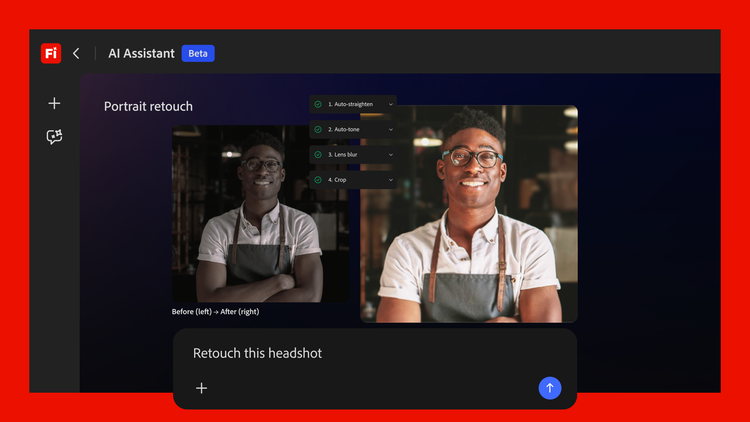
Adobe Firefly AI Assistant Moves Into Creative Cloud
Creative work slows down when you spend more time on cleanup than on ideas. The Adobe Firefly AI assistant is meant to cut that drag by working across Creative Cloud apps to complete tasks, not just generate a prompt response. That matters because the tedious jobs in design and video are rarely one-click problems. You need assets moved, variations checked, layers adjusted, and files passed from one tool to another without breaking the flow. Adobe is aiming at that friction, and the timing makes sense. Teams want faster output, but they also want more control over what gets changed and when. The real question is simple. How much of the grunt work should software be allowed to do for you?
According to TechCrunch, Adobe is pushing Firefly beyond a chat-style helper and into a tool that can act inside the apps people already use. That puts it in the growing class of agentic products, where the software is not only answering but also acting. Useful. Also a little unnerving.
What stands out
- Multi-app control: The Adobe Firefly AI assistant is built to move across Creative Cloud apps instead of staying locked inside one screen.
- Less busywork: It targets repetitive production tasks, the kind that eat time without adding much creative value.
- Agentic behavior: Adobe is moving from a helper that suggests to a helper that acts, which changes the trust equation.
- Workflow speed: The biggest gain may be faster handoffs, cleaner drafts, and fewer tiny mistakes.
How Adobe Firefly AI assistant works
At a high level, the pitch is straightforward. You describe the job, the assistant figures out the app path, and the work happens inside the Creative Cloud stack. Think of it like a pit crew for your workflow. You still steer, but the assistant handles the fast, repetitive moves that burn time and patience.
That sounds simple, and the simplicity is the point. Creative software is full of small tasks that add up. Export a version. Rename assets. Swap an image. Check a layout. Repeat. The Adobe Firefly AI assistant tries to turn those chores into a managed sequence instead of a scavenger hunt across menus and tabs. For a solo creator, that may save an afternoon. For a studio, it may smooth handoffs between design, motion, and review.
One reason this matters is that most creative teams already work inside a chain of apps. When the chain breaks, deadlines slip. A tool that can cross those app boundaries has a real edge, but only if it respects the structure of the project rather than flattening it.
What Adobe Firefly AI assistant means for Creative Cloud users
Adobe is not just selling convenience. It is trying to make Creative Cloud feel less like a set of separate products and more like one coordinated workspace. That is a bigger claim than a new filter or a faster export button. It suggests a future where routine creative operations become delegated work.
That is the tradeoff.
For most users, the upside is obvious. Faster asset prep. Fewer handoff mistakes. Less time lost to repetitive edits that do not require taste. The danger is more subtle. When an assistant can move through your files, it can also make assumptions about your intent. In creative work, assumptions are expensive.
Speed is welcome. Predictability is non-negotiable. If Adobe wants creators to trust an assistant inside their projects, it has to show its work and make every action easy to inspect.
That is why trust will matter as much as model quality. A designer does not need magic. A designer needs a tool that behaves like a careful colleague, not a cheerful intern with file access. If the assistant can show what it is about to change, or let you approve steps before they land, adoption gets easier. If it acts like a black box, the skepticism will be loud, and fair.
Where the first wins are likely to show up
The early use cases are easy to picture, because they are already the jobs people dislike most. The assistant should be strongest where the task is repetitive, rule based, and easy to verify.
- Preparing alternate versions of the same asset.
- Moving work between Creative Cloud apps without extra manual steps.
- Cleaning up routine production details like naming, sizing, and formatting.
- Helping teams get from draft to review faster (without changing the creative intent).
That is not glamorous. It does not need to be. The best workflow tools usually feel boring once they work well, because they disappear into the day. That is the bar here.
The control question in Adobe Firefly AI assistant
Adobe has a familiar problem. It has to make the assistant powerful enough to be useful and restrained enough to be trusted. Those goals pull against each other. If the system is too cautious, it becomes a novelty. If it is too free, it starts making edits people did not ask for.
Creative software has always been a balance between automation and judgment. The Firefly AI assistant pushes that balance further toward automation, and that will unsettle some users even if the output is good. Why? Because creative tools are personal. They hold raw files, half-finished ideas, and work that may never be seen by clients. Handing more of that process to software is not a small decision.
Still, the direction is hard to miss. Adobe wants to turn AI from a feature into a workflow layer. If it can keep the assistant transparent, controllable, and actually helpful, it may set the tone for the next round of creative software. If not, the market will treat it like another demo that looked better than it behaved.
What Adobe is really betting on
The smartest bet Adobe can make is not that creators want less work. They do. The real bet is that creators want less waste. That is a sharper argument, and a much more believable one. No one gets excited about a machine that writes over their choices. People do get excited when a machine clears the clutter between an idea and a finished file.
If the Adobe Firefly AI assistant can stay in that lane, it has a real chance. If it drifts into guesswork, users will push back fast. And they should. The future of creative tools will not be decided by how much AI they include. It will be decided by how well those tools respect the person using them.
So the next test is not whether the assistant can act. It is whether it can act without getting in the way.


