Apple Tightens macOS Full Disk Access for AI Agents
Your Mac may soon ask tougher questions before an app can read your files, messages, backups, and other private data. That matters because macOS Full Disk Access has become a larger target as AI agents move from simple chat boxes to software that can act across apps. TechCrunch reported that Apple is tightening these controls because AI agents create new risks, especially when they can inspect broad areas of a user’s system. I have covered Apple security changes for years, and this one feels less like a cosmetic permission tweak and more like a boundary reset.
The timing is not random. Agentic AI tools promise to summarize files, schedule work, manage email, and automate tasks. But what happens when a helpful assistant gets permission to see almost everything?
What matters now
- macOS Full Disk Access is powerful. It can expose sensitive files across the system, depending on the app and user approval.
- AI agents raise the stakes. A tool that can read, reason, and act can create different risks than a normal utility app.
- Apple appears to be narrowing trust. Expect more friction around broad permissions, especially for apps that handle personal data.
- Users and IT teams should audit access now. Old permissions often linger long after the original need is gone.
Why macOS Full Disk Access is changing
Full Disk Access sits inside macOS privacy settings under Apple’s Transparency, Consent, and Control system, often called TCC by developers and security teams. It was built to stop apps from quietly reading protected areas such as Mail, Messages, Safari data, Time Machine backups, and other user files.
For years, the tradeoff was clear. Backup tools, antivirus products, device management software, and developer utilities often needed wider access to do their jobs. You granted permission, usually once, and moved on.
AI agents change that comfort level.
A traditional app might scan files for malware or sync folders to the cloud. An AI agent can read a folder, infer meaning from the contents, connect details across documents, and then take an action through another app. That does not make every agent dangerous. It does make broad permission feel heavier than it did five years ago.
Full Disk Access was always a big key. AI agents make it feel more like handing over the building plan, the master key, and a staff badge at the same time.
Look, Apple has a long history of adding privacy friction after a new class of software starts stretching old assumptions. Camera access, microphone prompts, contact permissions, pasteboard alerts, and location controls all followed that pattern. The company is at its best when it forces developers to ask for less.
What macOS Full Disk Access lets apps do
The name sounds blunt because the permission is blunt. Full Disk Access can let approved apps reach protected files that normal sandbox rules would block. That can include app data, local databases, logs, email stores, and folders that may contain health, legal, financial, or workplace information.
On managed Macs, the issue gets sharper. A single employee may approve a productivity app without realizing it can index sensitive client material. In regulated sectors, that turns a personal click into a compliance problem.
Here are the app types you should examine first:
- AI assistants and automation tools that summarize files, search local documents, or operate across other apps.
- Security and device management tools that require broad system visibility.
- Cloud storage and backup apps that scan large parts of your home folder.
- Developer utilities that inspect logs, databases, containers, or project directories.
- Older helper apps that you installed once and forgot about.
Some of these apps have valid reasons for access. The point is to make each permission earn its place. Think of it like a restaurant kitchen. The chef needs the pantry, but the delivery driver probably does not need the safe in the office.
How AI agents turn a Mac permission into a data problem
The risk is not only that an app can read data. The risk is what the app can do after reading it.
An agent might summarize your tax folder, search contracts for renewal dates, or draft replies based on your email archive. Useful? Sure. But that same access could expose trade secrets, private photos, credentials stored in loose documents, medical records, or confidential chats if the app is poorly designed or compromised.
Security teams worry about three failure paths:
- Overcollection. The agent reads more files than the task requires.
- Prompt injection. A malicious document or email gives instructions to the agent, which then follows them.
- Data leakage. Sensitive content moves to a cloud model, plugin, log file, or third-party integration without clear consent.
Prompt injection deserves special attention. If an AI agent reads a document that contains hidden instructions, it may treat those instructions as part of the task. Researchers have shown versions of this attack across email, web pages, documents, and tool-connected chatbots. The industry still does not have a clean fix.
How to audit macOS Full Disk Access today
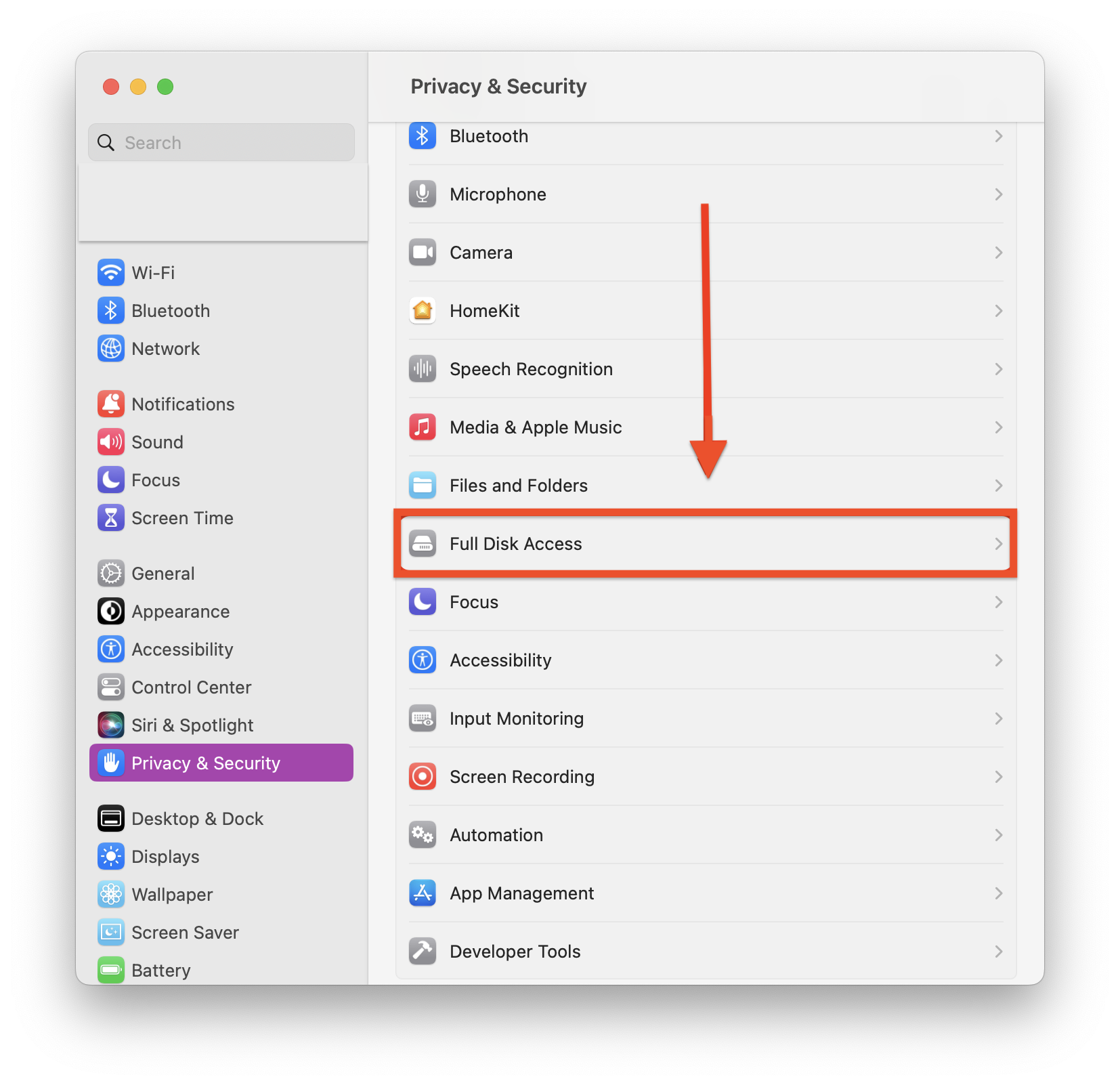
You do not need to wait for Apple’s next macOS prompt to clean house. On most recent versions of macOS, you can review access in System Settings. The exact path may vary by version, but it usually sits under Privacy and Security.
Use this quick audit:
- Open System Settings.
- Go to Privacy and Security.
- Select Full Disk Access.
- Review every enabled app.
- Turn off access for apps you no longer use or do not trust.
- Restart apps after changing access, since some permissions do not update while the app is running.
Be careful with security tools, backup software, and workplace management apps. If your Mac is managed by your employer, some settings may be controlled by a configuration profile. Ask your IT team before removing access from required software.
For personal Macs, I use a simple rule. If I cannot explain why an app needs Full Disk Access in one sentence, I turn it off and see what breaks. That sounds blunt, but it works.
What developers should expect from Apple
Apple has not built its privacy model around trust alone. It prefers prompts, entitlements, sandboxing, notarization, and review pressure. If the company sees AI agents as a new risk class, developers should expect tighter review of broad local access.
Good AI apps will need cleaner permission design. Ask for folder access when folder access is enough. Process data on device when possible. Explain what leaves the Mac, where it goes, and how long it is kept. Give users a switch that is easy to find, not buried behind three menus (yes, people notice).
Developers should also separate reading from acting. An assistant that can inspect files should not automatically gain the ability to send emails, modify documents, or run shell commands. Those are different powers. Treat them that way.
The best agent design is boring in the right places. Narrow access, clear prompts, visible logs, and easy revocation beat a flashy demo every time.
macOS Full Disk Access and the enterprise headache
For IT teams, this is where policy meets human behavior. Employees will install AI tools if those tools save time. Blocking everything rarely works for long, especially when teams are under pressure to move faster.
A better plan has three parts:
- Inventory. Track which apps have Full Disk Access across the Mac fleet.
- Policy. Define which AI tools can access local files and which data types are off limits.
- Training. Show employees real examples of risky permissions, not vague security slogans.
Mobile device management platforms can help, but policy should not be written by the MDM console alone. Legal, security, IT, and department leads need to agree on acceptable use. Otherwise, you get shadow AI with worse visibility.
The next permission fight is about agents
Apple’s move signals where desktop security is heading. File access used to be a static permission. Now it is part of a chain that can include language models, cloud services, browser sessions, plugins, automations, and enterprise data stores.
That chain needs smaller links. Users should grant access by task, folder, and duration when possible. Developers should stop treating broad access as the easy default. And Apple should make these controls clearer, because most normal people do not know what Full Disk Access really means until something goes wrong.
My practical advice is simple: open your Mac privacy settings this week, check Full Disk Access, and remove anything that cannot justify its reach. The next wave of AI agents will be more capable. Your permissions should get stricter before they get busier.