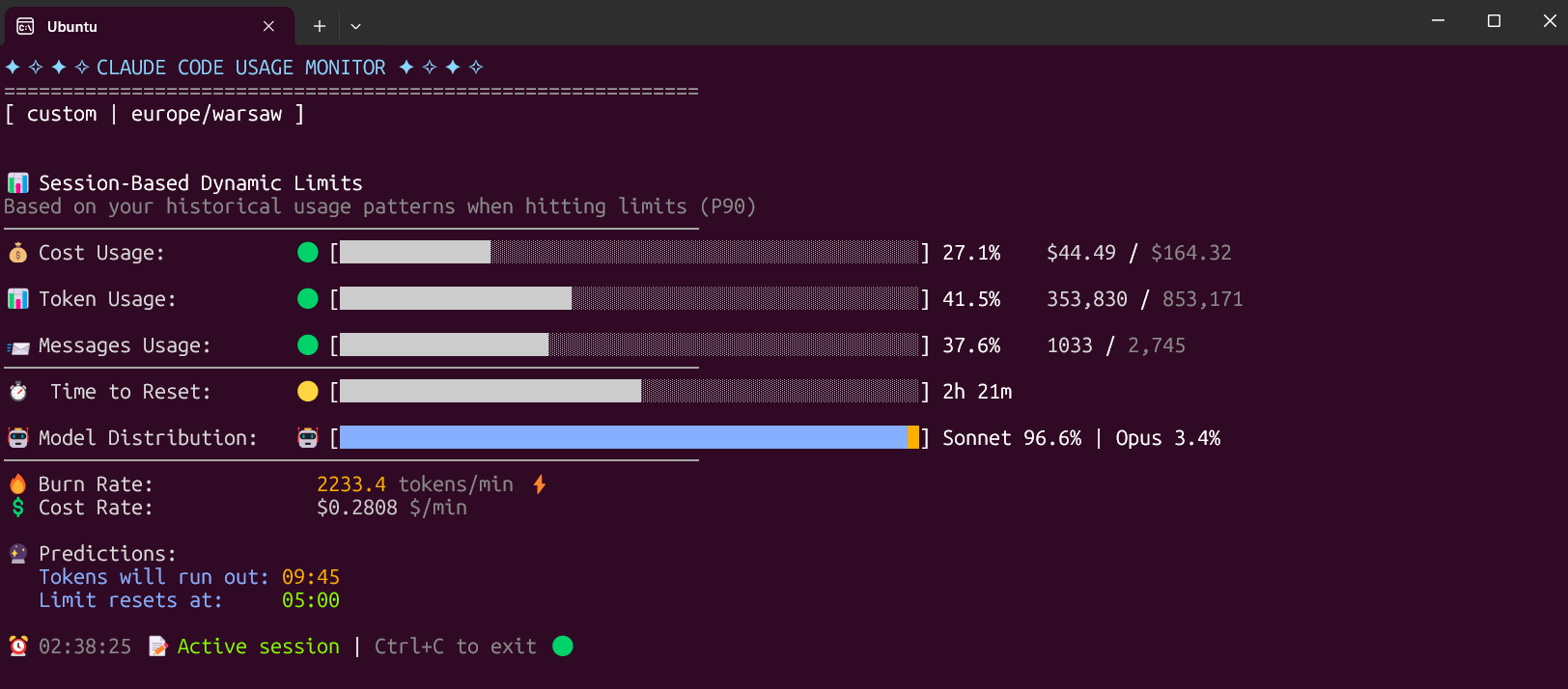
ClawdMeter for Claude Code Usage Tracking
If you use Claude Code a lot, keeping tabs on usage can turn into a quiet headache. You open the tool, run prompts, burn through requests, and then wonder where your limits went. That is why ClawdMeter stands out. This small desktop app focuses on Claude Code usage tracking with a tiny dashboard that surfaces your stats without forcing you to dig through menus or break your flow. For developers, power users, and anyone paying attention to model access limits, that matters right now. AI coding tools are becoming part of daily work, and once a tool becomes routine, visibility into cost and usage stops being optional. It becomes basic hygiene. ClawdMeter looks simple. But sometimes simple is exactly the point.
What stands out
- ClawdMeter turns Claude Code usage data into a compact desktop view.
- It solves a practical problem, which is seeing limits and activity without extra friction.
- The appeal is strongest for heavy Claude Code users who want constant visibility.
- Its value comes from focus, not feature sprawl.
What is ClawdMeter?
ClawdMeter is a lightweight desktop dashboard built to show Claude Code usage stats in a glanceable format. According to TechCrunch, the idea is straightforward. Instead of making users hunt for usage details, it places those metrics in a tiny desktop interface.
That sounds minor. It is not.
Good tooling often wins on one thing, which is reducing friction at the exact point where users feel it most. In this case, the friction is uncertainty. How much usage have you burned through? How close are you to a limit? Do you need to slow down before a long coding session?
Those are real questions, and a visible meter answers them faster than a settings page ever will.
Why Claude Code usage tracking matters
Claude Code usage tracking matters because AI coding tools are no longer novelty products. They are becoming part of regular software work, whether that means debugging, refactoring, writing tests, or scaffolding new features. Once developers depend on a tool, they need the same kind of feedback they expect from any serious system.
Think about it like the fuel gauge in a car. You do not want to stop every hour, pop the hood, and estimate what is left. You want a clear readout while you are driving.
That is the promise here. Fast visibility. Lower cognitive load. Better pacing.
And there is another angle. Usage limits can shape behavior. If a developer knows they are close to a threshold, they may batch requests more carefully, save high-value prompts for harder tasks, or switch to manual work for smaller edits. Without that visibility, people guess. Guessing is sloppy.
Why this small app could punch above its weight
Plenty of AI products try to impress you with broad feature sets. Honestly, many of them overbuild. They pile on dashboards, assistants, analytics layers, and team features before they have solved the first pain point cleanly.
ClawdMeter appears to do the opposite.
It picks one narrow job and sticks to it. That discipline is refreshing, especially in AI software where bloat shows up fast. A tiny utility can become sticky if it earns a permanent spot on your desktop and saves you from checking usage by hand ten times a day.
Sometimes the best AI tools are not the loudest ones. They are the utilities that remove one repeated annoyance so well that you stop noticing the annoyance at all.
That is the lane ClawdMeter seems built for.
Who should care about ClawdMeter?
Developers who live in Claude Code
If Claude Code is part of your daily workflow, a live meter makes immediate sense. You get ongoing awareness instead of periodic checking.
Users on capped plans
Anyone dealing with request ceilings or usage windows has a direct reason to care. Seeing your stats in real time can help you avoid hitting a wall in the middle of focused work.
Teams testing AI coding workflows
Teams evaluating how often developers lean on AI assistants may find this kind of utility useful as part of broader workflow observation. Not as surveillance. As visibility into tool dependence and practical limits.
People who hate dashboard hunting
Look, some users simply do not want another tab open. They want a tiny readout and then they want to get back to coding. Fair enough.
What to watch before the hype builds
There is a temptation to treat every useful AI side tool like a seismic shift. I would not do that here. ClawdMeter is interesting because it is practical, not because it changes the structure of AI coding.
So what should you watch?
- Data accuracy. If the usage numbers lag or drift, trust disappears fast.
- Desktop performance. A meter app should stay light and quiet, not become another resource hog.
- Setup friction. The whole point is convenience. If setup is annoying, the value drops.
- Longevity. Tools tied to fast-moving AI products need to keep up with API or product changes.
That last point matters more than it may seem. The AI tooling stack shifts constantly, and companion apps can break when platforms change names, limits, interfaces, or access methods. A clean little dashboard is useful only if it stays current.
How ClawdMeter fits the broader AI tools trend
The bigger story is not just ClawdMeter itself. It is what tools like this say about the market. We are moving from headline-grabbing foundation models to the less glamorous layer of operational utilities. Monitoring, usage awareness, workflow fit, and small interface improvements. That is where mature ecosystems start to form.
Claude Code usage tracking may sound like a niche issue today, but niche issues are often where durable products begin. Developers adopt the core model first. Then they start asking for better control, better visibility, and fewer blind spots.
That is a healthy progression.
It is also a sign that AI coding assistants are entering a more normal phase, where the support tooling starts to matter almost as much as the model. The same thing happened with cloud infrastructure, security tools, and CI systems. First came the big platform. Then came the ecosystem of smaller products that made daily use less messy.
If you are deciding whether to try it
Ask yourself one thing. Do you check your Claude Code usage often enough that it interrupts your work?
If the answer is yes, ClawdMeter makes sense. If the answer is no, then this may be a nice-to-have rather than a must-have. That is fine. Every utility has a target user, and the strongest products know exactly who that user is.
My early read is simple. This is the kind of tool experienced users will appreciate faster than casual users. Newcomers may shrug. Heavy users may keep it open all day (which tells you a lot).
The next signal to watch
ClawdMeter is worth watching because it focuses on a real behavior, not a fantasy use case. People using AI coding tools want quicker feedback on limits, activity, and pacing. That demand is not going away.
If more utilities like this show up around Claude, OpenAI, and other coding assistants, expect a second wave of products built around control rather than raw capability. And that may be the more useful wave in the long run. The question is simple. Which AI tools will save you more time next year, the giant models, or the small utilities that make them bearable to use?


