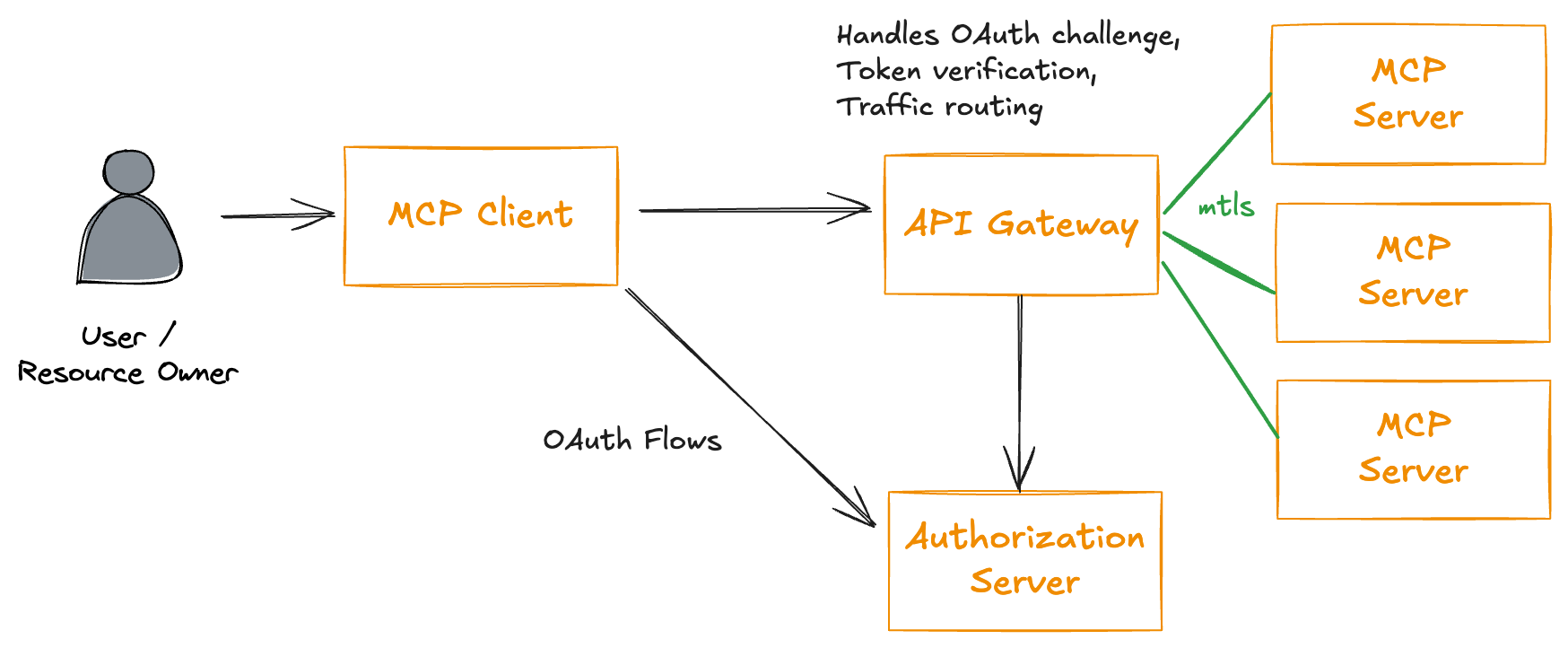
MCP Enterprise Auth Gets a Real Security Model
Teams want to connect AI assistants to internal tools without handing them the keys to everything. That sounds simple until you try to do it at enterprise scale. MCP enterprise auth is now part of that debate, and it matters because the Model Context Protocol is moving from hobbyist integrations into serious company workflows. Once AI agents can reach ticketing systems, databases, and customer records, weak access control stops being a theory problem. It becomes a live risk. And if your security model still treats every tool connection like a trusted script, you are already behind.
Look, the pressure is real. Security teams want identity-aware access, audit trails, and revocation. Product teams want fast integrations. Users want answers inside the chat window. Who gets what, and how do you prove it later?
What stands out in MCP enterprise auth
- Identity needs to sit at the center, not at the edge.
- Tool access must be scoped to the user, app, and task.
- Auditability matters if you need to explain an agent action later.
- Revocation has to be quick, or stale access becomes a liability.
- Delegation should be narrow, especially for sensitive systems.
The big shift is philosophical as much as technical. MCP started as a clean way to let models talk to tools. Enterprise auth turns that into a controlled system with policy, identity, and governance. That is a different beast.
Security leaders should stop asking whether an AI agent can call a tool. The better question is whether it should, under whose identity, and with what trace left behind.
Why MCP enterprise auth changes the access model
Most companies already know how to secure humans and services. They use SSO, OAuth, SCIM, role-based controls, and logs. The problem is that AI agents blur those lines. They are not fully human, and they are not just backend services either.
That creates a messy middle. If an assistant opens a support case, should it act as the employee, the application, or a delegated service account? If it reads a document and summarizes it, does that count as access to the source data? These questions are no longer theoretical. They shape how you build the authorization layer.
Think of it like a building with many doors and badges. A visitor badge should not open the server room, even if the visitor is carrying a very smart clipboard. Same logic here.
How to think about MCP enterprise auth in practice
You do not need a perfect architecture on day one. You do need a clear one. Start with the smallest set of permissions that lets the agent do useful work, then expand only when the control model holds up under review.
- Map the tool surface. List every MCP server, every action, and every data source.
- Classify access. Separate read, write, admin, and destructive operations.
- Bind identity. Decide whether the agent acts as a user, a service, or a delegated client.
- Log every request. Capture who asked, what the agent tried to do, and what policy allowed it.
- Test revocation. If someone leaves the company, can you cut off access fast enough?
That last step gets ignored more than it should. A strong auth story is not only about granting access. It is about taking it away cleanly. That is where a lot of enterprise AI setups get sloppy.
What security teams should ask vendors
If you are evaluating an MCP stack, do not get distracted by the demo. Ask how the system handles token exchange, user consent, short-lived credentials, and policy enforcement. Ask where the authorization decision lives. Ask how the platform separates a human user from an automated action (because that boundary can get blurry fast).
Also ask about standards support. OAuth 2.0, OpenID Connect, and enterprise IAM integration are not nice extras. They are the floor. If a vendor cannot explain how their MCP enterprise auth design fits into your existing identity stack, that is a red flag.
Some teams will try to bolt on controls later. Bad idea. Retrofits always cost more, and they usually leave gaps. Better to define the trust model before the first agent touches production data.
What this means for AI rollouts now
MCP enterprise auth pushes AI deployments toward the same discipline that enterprise software has needed for years. Least privilege. Separation of duties. Logging. Review. Nothing flashy. Everything necessary.
The upside is clear. You can give users useful AI features without turning every integration into a security exception. The tradeoff is also clear. Faster experimentation gets replaced by more structure. But that structure is what lets AI move from pilot projects to core systems.
And if your org is serious about AI, that tradeoff is non-negotiable.
What to do next
Start with one workflow. Pick a narrow use case, connect one MCP tool, and document the identity path end to end. Then test what happens when permissions change, tokens expire, or a user leaves. That exercise will tell you more than any vendor slide deck ever will.
The real question is not whether MCP can connect to your stack. It is whether your access model can survive the first messy week of real use.