Microsoft Recall Privacy Backlash: What Windows Users Need to Know
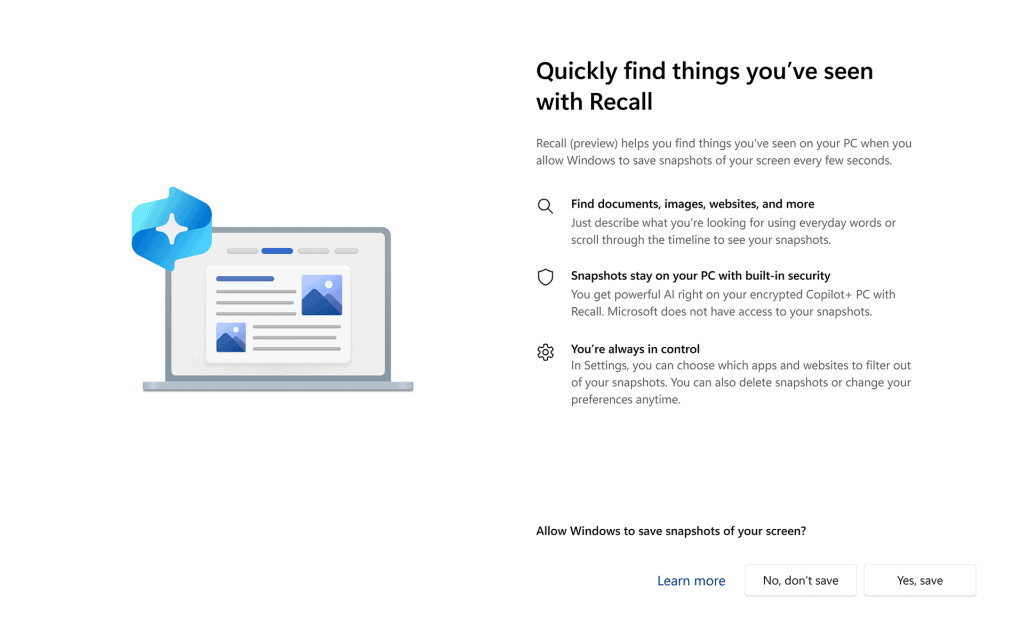
Microsoft pitched Recall as the clever AI that remembers everything you do on your PC. That pitch collided with reality once security researchers flagged how much personal data the feature might expose. Microsoft Recall privacy worries are not academic: storing a rolling archive of screenshots creates a tempting target for malware, lawsuits, or office snoops. Microsoft paused the launch after critics compared Recall to a keylogger. You deserve to know what it does, what changes Microsoft promised, and how to keep your own data out of the blast radius.
Why It Matters Now
- Recall captures and indexes screenshots locally, creating a searchable timeline of your activity.
- Researchers warned attackers could grab that database in minutes with common malware kits.
- Microsoft shifted to an opt-in model and added extra authentication after the backlash.
- Enterprise IT teams are weighing outright blocks until controls look solid.
- Privacy regulators are watching because sensitive data can appear in those captures.
What the Microsoft Recall privacy storm is really about
Think of Recall like leaving a journal open on your desk. It promises convenience, yet any passerby can read the page if you do not lock the door. Here, the “door” is Windows security, which already struggles against commodity infostealers. Who wants an always-on visual log that could reveal passwords, medical portals, or legal documents?
Microsoft initially framed Recall as safe because processing happens on-device. That line ignores the obvious: once data exists, malware can take it. Silence on data retention breeds mistrust.
After years covering Windows launches, I rarely see a feature reverse course this fast. The public smelled risk immediately.
How Recall works under the hood
Recall periodically screenshots the desktop, then uses a local AI model to generate embeddings and OCR text. It stores everything in a searchable SQLite database. Performance costs are modest on new Copilot+ hardware, but the privacy cost depends on your threat model. A family PC? Maybe less risky. A laptop packed with customer contracts? Different story.
Microsoft’s updated plan requires explicit opt-in, Windows Hello re-authentication to open Recall, and a toggle to exclude specific apps or sites. That is progress, but it still leaves a trove of context-rich images on disk. Malware does not care whether you clicked “I agree.”
Practical steps to guard your data
- Keep Recall disabled until your security team signs off. If you are solo, wait for independent red-team reports.
- Encrypt the drive with BitLocker and enforce strong Windows Hello authentication (think hardware keys, not just a short PIN).
- Use browser profiles that suppress sensitive pop-ups and avoid opening banking or HR portals on the same Windows account as Recall.
- Harden the endpoint: up-to-date EDR, application allowlisting, and strict USB controls cut off the easy exfil paths.
- Audit accounts with administrative rights. Fewer admins mean fewer lateral moves into the Recall database.
Here’s the thing: security is not just software. It is habits. Treat Recall like any other data store and set policies now.
Where Microsoft Recall privacy fixes need to land next
Microsoft says future builds will encrypt the Recall index per user session and block third-party access without elevated tokens. That helps, but it does not solve social or legal exposure. Courts can subpoena local data. Employers can demand logs. Microsoft should ship automated redaction for sensitive fields and a one-click purge schedule.
But will Microsoft go that far, or will convenience win? If the company wants Copilot+ to feel trustworthy, it must prove Recall can be both useful and unobtrusive. Right now the balance tilts toward risk.
Think of a goalie in football. You only notice them when they miss. Privacy controls work the same way; one breach and the feature’s reputation is toast.
What to watch next
Regulators in Europe and the US are asking how Recall complies with data minimization rules. Enterprise IT buyers are forcing the pause button until they see third-party audits. Developers and OEMs will need clearer APIs that let them mark their apps as “do not capture.”
The story is not over. Microsoft can still turn Recall into a model for on-device AI done right, or into a cautionary tale for everyone else.
Looking ahead
Copilot+ PCs will keep rolling off the line, and Microsoft will keep betting on ambient AI. The question is whether users will trade intimacy for convenience. My bet? People will embrace AI features that feel like helpful assistants, not hidden surveillance. Microsoft has to prove Recall sits on the right side of that line.


