Windows 11 5GB Monthly Updates Explained
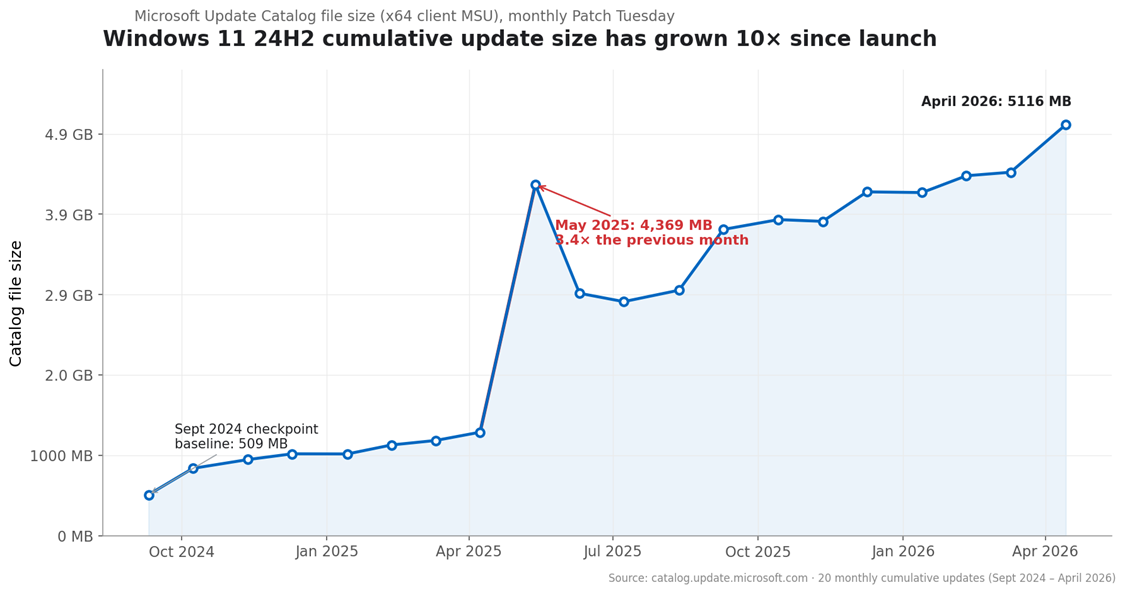
You expect Windows Update to be annoying sometimes. You probably do not expect a routine patch to swell toward 5GB. Yet that is the issue behind Windows 11 5GB monthly updates, and it matters right now because large MSU packages hit storage limits, strain slower connections, and make patch management harder for IT teams and home users alike. Microsoft keeps adding more pieces to Windows 11, including AI features, servicing stack changes, and broad component bundles. But AI is only one part of the story. The larger problem is how Windows ships and maintains the whole operating system. If your laptop has a cramped SSD, or your office manages dozens of PCs over metered links, these update sizes are more than a nuisance. They are a systems design problem.
What stands out
- Monthly Windows 11 MSU packages can approach 5GB because they include more than one simple security fix.
- AI components may add weight, but cumulative packaging and broad compatibility support appear to be bigger drivers.
- Large updates create real costs in bandwidth, storage use, and deployment time.
- Home users have limited control, but IT teams can reduce pain with better update channels and servicing choices.
Why are Windows 11 5GB monthly updates so large?
The short answer is cumulative servicing. Microsoft does not ship each fix as a tiny, isolated patch. It often rolls many changes into one package so a device can move to the current state in a single jump. That approach is easier to support, but the file size can balloon.
Windows 11 also carries a lot of baggage. Compatibility layers, language resources, recovery components, drivers, feature toggles, and servicing metadata all add up. Think of it like remodeling one room in a house but still needing to inspect the wiring, plumbing, and foundation every time. Efficient for the contractor, less fun for the owner paying the bill.
And yes, AI features can make the package heavier. But if you blame Copilot for the whole thing, you are missing the bigger issue.
Where AI fits into Windows 11 5GB monthly updates
AI is an easy villain because it is visible. New Windows 11 features tied to on-device models, system apps, and updated frameworks do take space. On newer PCs, especially Copilot+ devices, local AI capabilities may require model files, runtime support, and app-level updates.
But the reporting from Windows Latest points to a broader explanation. These giant MSU files appear tied to the way Microsoft packages cumulative updates for many system components at once, not just to AI add-ons. That matches years of Windows servicing history. The company prefers one broad patch train over a pile of smaller moving parts.
Big Windows updates are usually a packaging story first, and a feature story second.
That distinction matters. If the root issue is servicing architecture, then removing one flashy AI feature will not shrink updates in a meaningful way.
What is inside these giant MSU packages?
Microsoft does not always present this in plain English for normal users, which is part of the frustration. Still, large MSU packages often include a mix of elements:
- Security fixes for core Windows components
- Quality updates for the operating system
- Servicing stack updates that help future patches install correctly
- Files for multiple hardware and configuration scenarios
- Compressed payloads that still expand during install
- Component store updates that support rollback and repair
Here is the practical catch. A 5GB download is not the same as 5GB of permanent disk growth, but it can still consume temporary storage during install and stress the WinSxS component store. On smaller machines, that is enough to trigger failed updates or cleanup chores.
Why this is a bigger problem for some users
If you have fiber internet and a 1TB SSD, you may shrug and move on. Plenty of people cannot. Schools, small businesses, and users in areas with slow or capped broadband feel this first.
Bandwidth is only one piece. Large updates also increase install time, reboot windows, and the chances of something breaking mid-process. For managed environments, that means longer maintenance cycles and more pressure on WSUS, Microsoft Intune, or Windows Update for Business workflows.
Small drives get punished fastest.
That is why this topic deserves more attention than it gets. Update size sounds boring until a critical patch fails on hundreds of devices because there is not enough room to stage it.
What home users can do about Windows 11 5GB monthly updates
You cannot redesign Microsoft’s patch system from your desk. You can cut the pain, though.
- Keep at least 20GB of free space if possible. Windows updates often need breathing room for staging and rollback.
- Use Storage Sense and remove temporary files before patch day.
- Install updates on a stable connection. Interrupted downloads waste time and can corrupt the process.
- Check optional updates carefully. You may not need every driver or preview patch right away.
- Restart promptly after security updates so pending files do not stack up.
Honestly, this is basic maintenance. But basic maintenance matters when update packages keep getting fatter.
How IT teams should respond
Enterprise admins have more options, and they should use them. If monthly packages are growing toward 5GB, patch strategy needs a hard look.
Use smarter distribution
Delivery Optimization and local caching can reduce repeat downloads across fleets. Pulling the same large package once per site is a lot better than having every endpoint fetch it separately.
Review your servicing model
Windows Update for Business, Intune, WSUS, and Configuration Manager each handle deployment differently. The best choice depends on branch offices, VPN use, and patch rings. One-size-fits-all rarely works.
Watch storage health
Endpoints with 64GB or 128GB drives are the danger zone. Audit free space before broad rollout, especially on older laptops and shared devices.
Test on mixed hardware
Why? Because update bloat tends to expose the weakest machines first. The newest desktop in headquarters is not the machine that tells you where the failures will happen.
Is Microsoft likely to shrink Windows 11 5GB monthly updates?
Maybe at the margins. I would not bet on a dramatic reversal. Microsoft has strong incentives to keep cumulative updates broad, predictable, and easy to validate across millions of hardware combinations. That favors reliability in theory, even if it creates heavier packages in practice.
There may be technical ways to slim things down through better differential updates, cleaner component separation, or more modular feature delivery. But Microsoft has talked about efficiency before, and Windows still tends to grow rather than slim down. Look, software platforms age like cities. They rarely get simpler as more roads, rules, and neighborhoods pile up.
What this says about Windows 11
The story here is not just that AI is making Windows heavier. It is that Windows 11 is becoming a denser service platform, with more built-in features, more dependencies, and a patching model designed around sweeping cumulative maintenance. That may be acceptable for powerful modern PCs. It is a rough deal for everyone else.
If Microsoft wants people to trust Windows as a low-friction platform, update efficiency has to become a product priority again. Until then, expect the monthly patch cycle to stay bulky, and ask a simple question every time a giant update lands: does this system still serve the user, or is the user now serving the system?