Claude Code Workflow Tricks Developers Can Steal Today
You are drowning in pull requests and context, and the clock is not slowing down. The newly shared Claude Code workflow from its creator shows how to keep coding velocity while letting an AI pair-programmer do the heavy lifting. It matters because every hour you claw back from boilerplate or tedious refactors is an hour you can spend on features that customers notice. The workflow leans on short prompts, crisp specs, and tight feedback loops rather than magic. Why chase hours of context switching when a short prompt suffices? And here is the thing: the steps are simple enough to copy right now.
Fast Wins You Can Apply
- Use one-sentence prompts to set scope; expand only when the model stalls.
- Hand the model your actual files, not summaries, to avoid drift.
- Keep review passes short and frequent to catch regressions early.
- Adopt a repeatable spec format so teammates read and write faster.
Claude Code Workflow Setup
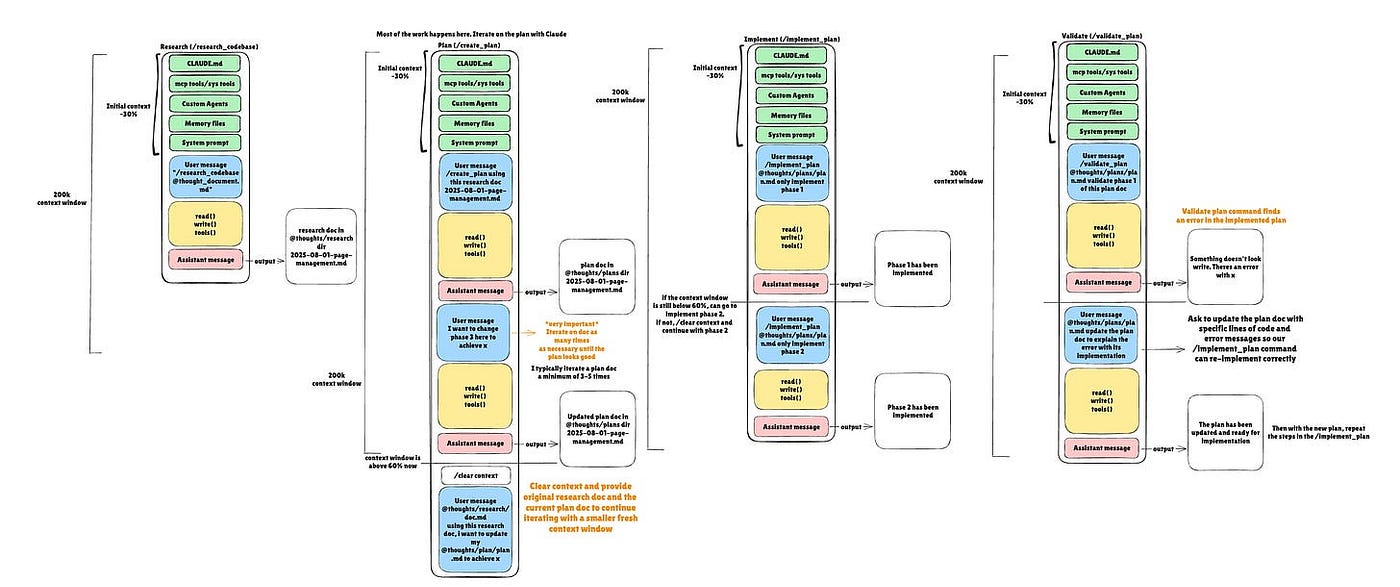
The creator builds every session around a small prep checklist, like a chef laying out mise en place. Start by opening the exact files you plan to change, then paste them into Claude Code with a sharp prompt that names the outcome and constraints. Avoid laundry lists of context; the model responds best to concise goals.
One sentence that nails the job can be stronger than a paragraph of fluff.
Next, state the testing path. Mention the command, the dataset slice, and the expected signal. This trims back-and-forth because the model knows how you will verify the work. If a database or API key is off-limits, spell that out to prevent risky suggestions.
Spec Format That Works
- Goal: A clear one-liner, including the component name and behavior change.
- Files: Exact paths you will paste. No vague references.
- Constraints: Performance, security, or style rules (yes, even in legacy code).
- Tests: Command to run and what passing looks like.
“Short prompts plus real files beat long narratives every single time.”
Claude Code Workflow in Action
Imagine a sprint where you need to refactor a flaky auth handler. Feed Claude Code the handler file and the failing test snippet. Ask for a fix that preserves the interface and improves logging. Keep the request crisp, then iterate: run the suggested patch locally, paste the error back, and tighten the ask. This loop mimics a batting cage session where each swing gets feedback right away.
Why not dump the whole repo? Because smaller contexts reduce hallucination and keep the model aligned with your intent. Treat each exchange like a unit test: scoped, fast, and measurable.
Debugging with Claude Code workflow
When tests fail, resist the urge to rewrite the prompt from scratch. Reply with the error and a narrow ask: “Fix the null check in auth_handler.py without changing the interface.” This keeps the model focused. Pair that with a quick log snippet so it can see the exact branch that misbehaves.
Sometimes the first attempt still misses. That is fine. Re-run with a sharper constraint or paste the relevant function only. The rhythm is what matters.
Team Play for Claude Code workflow
Teams thrive when everyone uses the same prompt patterns. Create a shared template in your docs that mirrors the spec format above, and ask reviewers to enforce it during code review. Add a short style note for Claude responses: prefer patches over prose, and always include the test command.
Rotate who maintains the prompt template each sprint. It keeps the process fresh and prevents drift into vague requests. Think of it like rotating the point guard so everyone learns how to run the offense.
Security and Data Boundaries
Paste only the code you can share. If secrets are present, scrub them first or use redacted placeholders. Spell out security rules in the prompt so Claude Code never proposes risky shortcuts. Document these guardrails in the same template to remove guesswork.
Where Claude Code workflow Fits Next
Claude Code shines on refactors, docstring updates, and test writing. It can also draft migration plans for APIs when you give it precise constraints and a target schema. What about greenfield design? Use it for scaffolding, then switch to human-led design reviews before merging.
I see teams pairing Claude Code with lightweight feature flags to ship faster while keeping rollback paths obvious. It is a solid pairing that keeps risk contained.
Closing Shot
Adopt the Claude Code workflow as a repeatable playbook, not a one-off experiment. Start with one squad, track cycle time, and expand only when you see real gains. Ready to see how fast your backlog shrinks?


